AccessionFlow


AccessionFlow is a toolkit for capturing data from instruments and depositing it in a data store, such as an XNAT instance or a folder hierarchy on a local disk or in an S3 bucket.
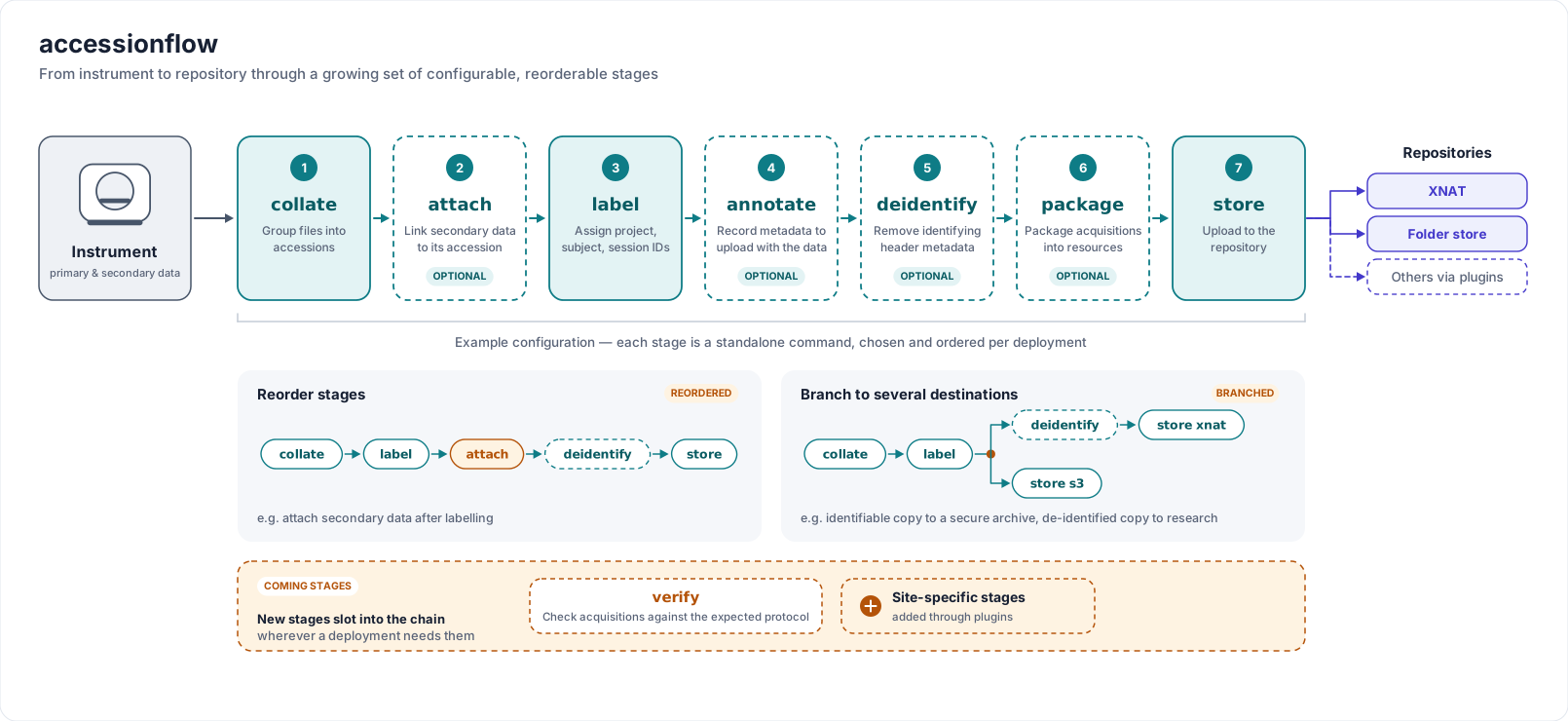
Data files coming straight off a scanner or other instrument aren't organised the way a data store expects, and — particularly on clinical scanners — often still carry patient-identifying information that needs stripping before they leave clinical control. AccessionFlow contains tools for each step of this process:
Collating files from a source, such as a folder or an Orthanc server, into accessions, acquisitions and resources
Labelling each accession with where it belongs in the data store, e.g. its XNAT project, subject and session
De-identifying files using flexible, file-format-specific methods
Depositing the labelled accessions in the data store, and checking that they all made it
Each of these is a separate stage that reads the previous stage's output directory and writes its own, so the stages can be chained together and left running continuously as services, picking up new files as they arrive:
collate <source>  →  [attach]  →  label <store>  →  [deidentify]  →  [package]
                  →  store <store>  →  check-store <store>
Where the files come from and where they go are both plugins: sources
provide the collate subcommands, and data stores provide the
label, store and check-store subcommands. The stages in between work the same
way whatever the source and store.
Start with the Quick start, which collates sample data and deposits it in a folder store and then in XNAT, then see:
Concepts — the ideas every stage relies on
Sources — collating from folders or an Orthanc server
Stages — attaching, labelling, de-identifying and packaging
Data stores — depositing in XNAT or a folder store
Deployment — running an accession flow continuously with Docker or Kubernetes
Command-line interface — the full command-line reference
Installation
The recommended way to run AccessionFlow, particularly for a long-running node, is the published Docker image, which bundles the CLI as its entrypoint along with all of its external dependencies (e.g. dcm2niix, MRtrix3):
$ docker run ghcr.io/australian-imaging-service/accessionflow --help
See Deployment for how this fits into Docker Compose or Kubernetes.
Alternatively, AccessionFlow can be installed for Python >=3.11 using pip:
$ python3 -m pip install accessionflow
Depositing in a folder store on S3 or over SFTP needs the s3 or ssh extra, e.g.
python3 -m pip install accessionflow[s3].
The command is accessionflow, which these docs use throughout. acflow is
installed as a shorter alias for it, matching the ACFLOW_ prefix of the
environment variables.
License
This work is licensed under the Apache License, Version 2.0