Deployment
Rather than a one-off run, most nodes want collate/label/deidentify/
store running continuously, each watching its input directory and picking up new
files as they arrive. Every stage except check-store supports this directly with
--loop <seconds>: instead of running once and exiting, the command runs again every
<seconds> seconds, forever, in a single process.
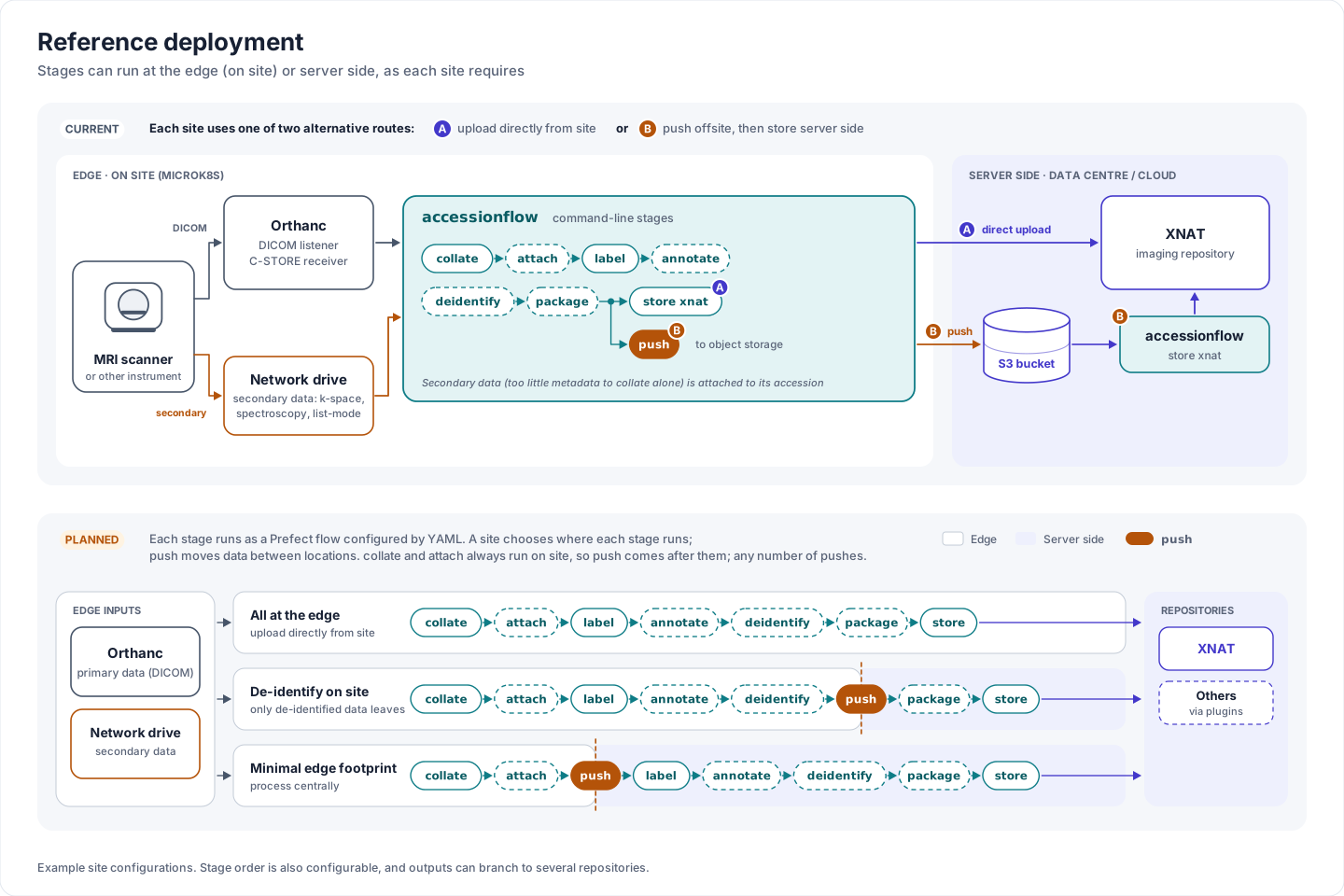
Where stages run: today's two routes to XNAT, and planned site configurations that split stages between the edge and server side with push.
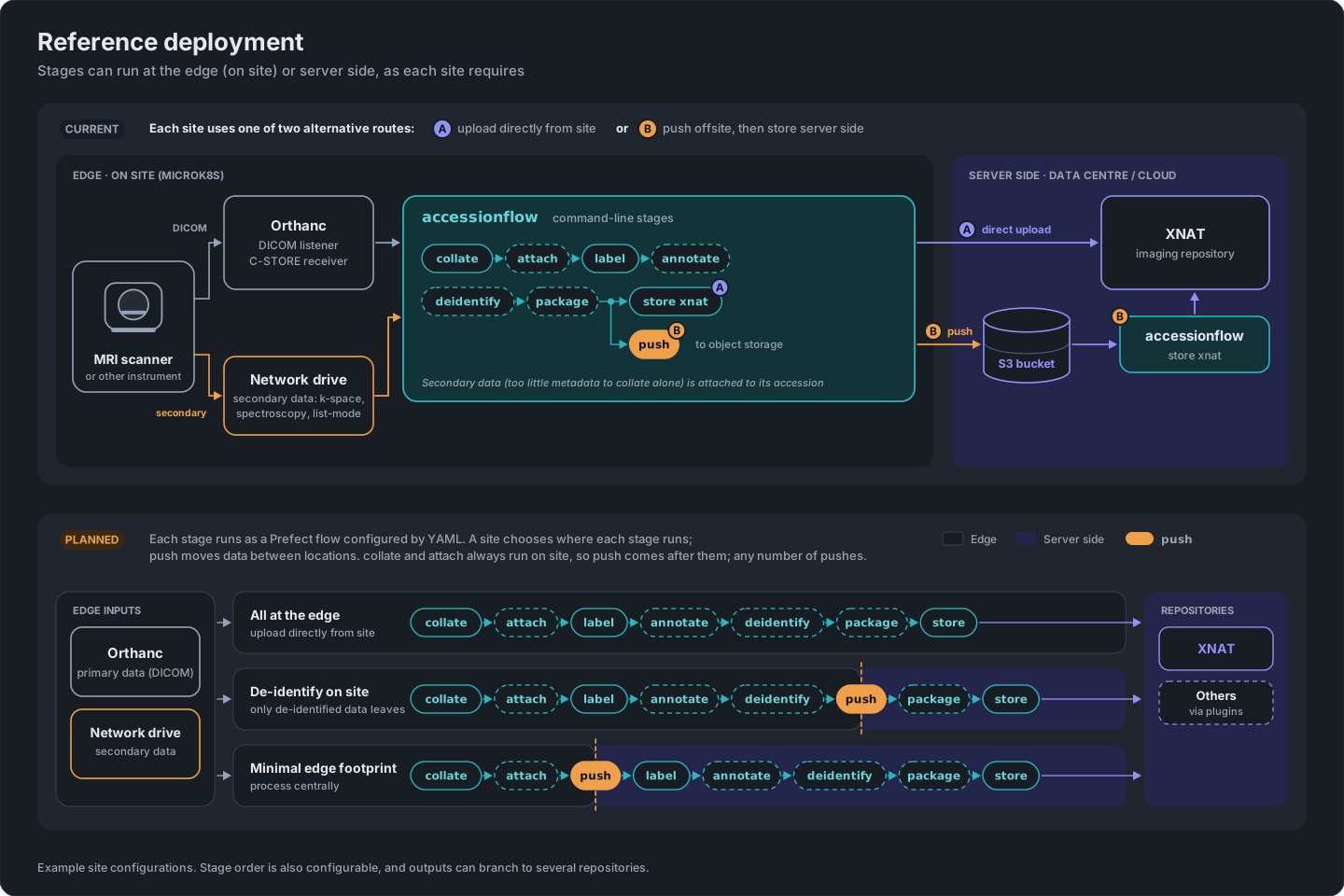
Where stages run: today's two routes to XNAT, and planned site configurations that split stages between the edge and server side with push.
Errors processing an individual accession (a bad file, a missing field, a dropped connection) are logged and skipped rather than crashing the process, and the accession is tried again on the next run (see Running continuously and handling errors). So each stage is designed to be started once and left running, rather than needing a process supervisor to restart it after every transient failure, though a restart policy is still good practice as a backstop (see below).
A published Docker image (ghcr.io/australian-imaging-service/accessionflow) wraps
the CLI as its entrypoint, so each stage becomes a single long-running container:
$ docker run -d \
    -v /data/incoming:/input \
    -v /data/staging:/staging \
    ghcr.io/australian-imaging-service/accessionflow \
    collate folder /input /staging/collated --loop 300
Repeat with label, optionally deidentify, and store as separate
containers, each mounting the previous stage's output as its input, chained through a
shared staging area on disk (or an S3 bucket, which store/check-store can
read from directly). For an Orthanc server, run collate orthanc in place of
collate folder, with Orthanc's storage directory mounted on the same file system as
the staging area (see Orthanc).
Docker Compose
A docker-compose.yml can express the whole chain as one stack, with each stage as
a service sharing a named volume for the staging directories:
services:
  collate:
    image: ghcr.io/australian-imaging-service/accessionflow
    command: collate folder /input /staging/collated --loop 300
    volumes:
      - /data/incoming:/input
      - staging:/staging
    restart: unless-stopped

  label:
    image: ghcr.io/australian-imaging-service/accessionflow
    command: label xnat /staging/collated /staging/labelled --loop 300
    volumes:
      - staging:/staging
    restart: unless-stopped

  store:
    image: ghcr.io/australian-imaging-service/accessionflow
    command: store xnat /staging/labelled xnat.example.org --loop 300
    environment:
      ACFLOW_USER: my-upload-user
      ACFLOW_PASS: my-upload-password
    volumes:
      - staging:/staging
    restart: unless-stopped

volumes:
  staging:
Kubernetes
The same shape maps onto a Kubernetes Deployment per stage (one replica each,
restartPolicy: Always), with the staging directories on a shared
PersistentVolumeClaim mounted into each Pod, and connection details (XNAT host,
user, password) injected via a ConfigMap/Secret as ACFLOW_* environment
variables rather than passed as command-line flags. check-store doesn't support
--loop, so it's a natural fit for a CronJob instead, run periodically to audit
what has and hasn't made it to the data store rather than as an always-on service.
Rather than writing these manifests from scratch, ais-edge provides ready-made Helm charts for deploying AccessionFlow (alongside other edge-node components) to Kubernetes, and is a good starting point for a production setup.