Concepts
This page covers the ideas that every stage relies on. The pages for the sources, stages and data stores link back here rather than repeating them.
Accession flows
An accession flow is the chain of stages that takes accessions from where their files come from to the data store they are deposited in. Each stage is a separate command that reads the previous stage's output directory and writes its own:
collate <source>  →  [attach]  →  label <store>  →  [deidentify]  →  [package]
                  →  store <store>  →  check-store <store>
Sources are where files come from. Each one provides a
collatesubcommand, e.g.collate folderorcollate orthanc.Data stores are where accessions are deposited. Each one provides
label,storeandcheck-storesubcommands, e.g.label xnat.The stages in between (
attach,deidentify,packageandannotate) work the same way whatever the source and store, and are all optional.
Because the stages only communicate through directories, they can be run one after another by hand, on separate schedules, on separate machines sharing a file system, or continuously as services (see Running continuously and handling errors).
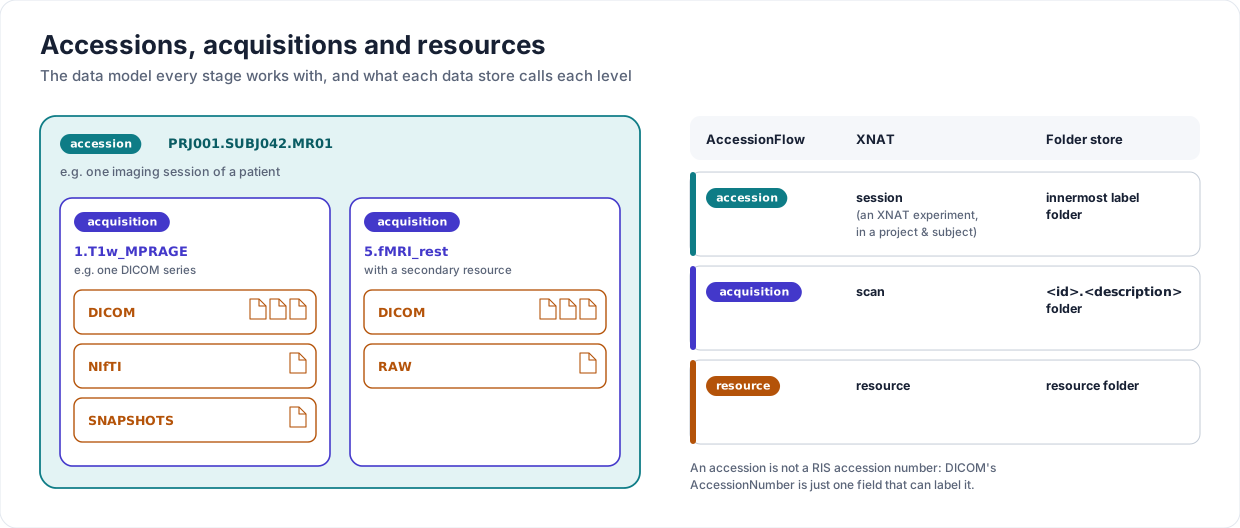
Accessions, acquisitions and resources
The data is modelled so that it isn't specific to imaging or to one data store:
- Accession
The data from one experiment, handed from stage to stage, e.g. an imaging session of a patient, a preclinical scan of an animal, the imaging of a tissue specimen or phantom, or a sequencing run. Its labels, which say where it belongs in the data store, are set by the
labelstage. An accession is not a RIS accession number: DICOM'sAccessionNumberis just one metadata field that can be used to label it.- Acquisition
One distinct dataset within an accession, e.g. a scan or a sequencing library. For DICOM it is one series, not DICOM's narrower sense of an acquisition within a series.
- Resource
A set of files holding one form of an acquisition's data, e.g. its DICOM or NIfTI version, or of the accession itself for accession-level resources.
Each data store has its own names for these:
AccessionFlow |
XNAT |
Folder store |
|---|---|---|
accession |
session, a kind of XNAT experiment (within a project and subject) |
the innermost label folder |
acquisition |
scan |
|
resource |
resource |
resource folder |
Staging directories
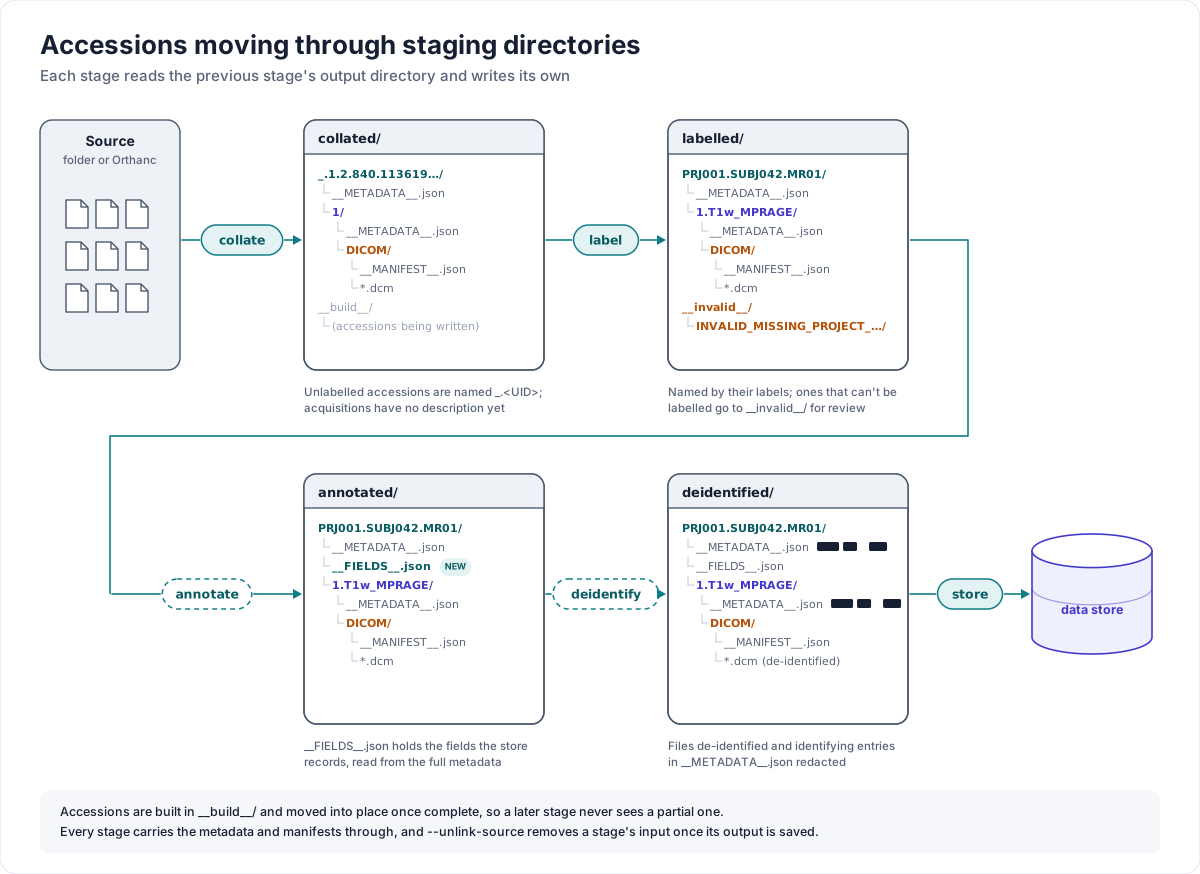
Each stage writes its accessions to its output directory in a plain, human-readable layout:
<accession>/
    __METADATA__.json                  # accession-level metadata
    <acquisition-id>.<description>/
        __METADATA__.json              # acquisition-level metadata
        <resource>/
            __METADATA__.json          # resource-level metadata
            __MANIFEST__.json          # checksums + datatype
            <data files>
A collated accession hasn't been labelled yet, so its directory is named _. followed
by its UID (e.g. the DICOM StudyInstanceUID) and its acquisitions have no
description yet. Once labelled, it is named by its labels joined by ., e.g.
<project>.<subject>.<session> for XNAT. annotate adds a __FIELDS__.json
alongside the accession's metadata (see Annotate).
Accessions are built in a __build__ subdirectory of the output directory and moved
into place once they are complete, so a later stage never sees a partly written one.
The manifests let the stages check that files haven't changed since an earlier stage
wrote them.
See Data model: building your own tools for working with this layout from your own scripts.
Metadata fields and specifiers
The options that decide how files are collated (--accession, --acquisition,
--resource) and labelled (e.g. --project or --level) take a specifier: the
name of a metadata field to take the value from. For DICOM the fields are the DICOM
keywords, e.g. StudyInstanceUID or SeriesDescription, and a specifier can index
a multi-valued one, e.g. ImageType[2:]. Other formats provide their own fields, and
Folders can add more from the files' paths or from a table.
A specifier can instead be a Python format string over several fields, to compose a value from more than one and/or apply formatting:
$ accessionflow collate folder ... --accession '{PatientID}_{StudyDate:%Y%m%d}' all
A specifier is treated as a format string if it contains a {, and as a plain field
name otherwise. A %-style format spec on a field ({StudyDate:%Y%m%d}) works
whether that field is still a date value or has become a plain string (e.g. after being
reloaded from a __METADATA__.json file written by an earlier stage): a plain string
is parsed as a date first if the format spec looks like it wants one. If a field in the
specifier can't be resolved at all, that part of the value falls back to a placeholder
(see When a label can't be resolved).
The options of collate folder take a specifier and the datatype it applies to,
e.g. --acquisition SeriesNumber medimage/dicom-collection, and can be repeated to treat
datatypes differently. all applies a specifier to every datatype, as above.
Labels and data stores
Labelling decides where each accession belongs in the data store. Each store has its
own label levels: XNAT has a fixed project, subject and session, while a folder store's
levels are named when labelling, with --level. So each store provides its own
label subcommand, and an accession is labelled for one kind of store. The store
type is saved with the accession's metadata, and store folder refuses an accession
labelled with label xnat, and store xnat one labelled with label folder.
The first label is also what Deidentify uses to choose a recipe, e.g. the XNAT project.
When a label can't be resolved
If a field a label is taken from isn't present in an accession's metadata, the
accession isn't dropped. It is given a unique placeholder label instead
(INVALID_MISSING_<FIELD>_<random>) and saved under an __invalid__ subdirectory of
the output directory, e.g.
labelled/__invalid__/INVALID_MISSING_PROJECT_ab12cd34.Session_Label.123/, rather than
alongside the accessions that were labelled normally. A misconfigured field, or an
accession that genuinely doesn't have the data it needs, can then be found and reviewed
or reprocessed, rather than only showing up as a line in the logs.
Cleaning up previous stages
By default every stage leaves its input in place. --unlink-source removes the input
once it has been processed successfully. What it removes depends on whether the input is
a directory that AccessionFlow wrote:
collate folderandattachThe input files live somewhere AccessionFlow doesn't own, perhaps alongside files of other accessions that haven't been processed yet. So each processed file is removed one by one, and
allandkeep-metadatabehave the same.collate orthancNot yet implemented: the studies stay in Orthanc, and the processed label stops them being collated again (see Orthanc).
label,deidentifyandpackageThe input is a staging directory that an earlier stage wrote, so there are two modes:
allremoves the files that were present when the accession was loaded, then any directories left empty.keep-metadataremoves only the files inside the loaded resource directories, leaving the accession's and acquisitions'__METADATA__.jsonbehind. This metadata-only skeleton is enough forattachto add files that turn up late, after the data itself has moved on (see Attach files without relevant metadata).
The files to remove are recorded when the accession is loaded, so a file that arrives while the stage is running stays for its next run, and a resource directory that arrives after the load stays in place. The input is only removed once the output has been saved successfully; if processing or saving fails, the input stays. Files that an earlier stage has published must not be changed or replaced afterwards: a replacement at a recorded path is outside this contract.
Running continuously and handling errors
Every stage except check-store takes --loop <seconds>: instead of running once
and exiting, the command runs again every <seconds> seconds, timed from the start of
one run to the start of the next, picking up whatever has arrived in its input since.
See Deployment for running the stages as services.
--wait-period <seconds> (on the sources and stores) skips anything modified more
recently than that, so that files that are still being transferred aren't processed
partially. Skipped accessions are picked up by a later run.
An error processing one accession (a bad file, a missing field, a dropped connection) is
logged, and the stage moves on to the next one. The failed accession's input stays, so
it is tried again on the next run. --raise-errors raises the first error instead,
which is useful for debugging, so it can't be combined with --loop.